
Fujifilm X-T5 firmware update: should UAE owners install today, or wait?
A Fujifilm X-T5 firmware update landed on 10 Nov 2026, with X-H2 and X-H2S builds too. What each official page fixes, and how UAE owners can update safely.
Key takeaways
- Fujifilm posted X-T5 firmware Ver.4.32 on 10 November 2026, with bug-fix builds the same day for the X-H2 (Ver.5.33) and X-H2S (Ver.7.31).
- Each official page lists the same four named bug fixes, plus some other minor bugs. These are bug-fix releases, not a new feature set.
- If the camera is already on the latest version, Fujifilm says no upgrade is required.
- Update with a fully charged battery and a card formatted in the camera, and never switch off during the write, which Fujifilm says takes about five minutes at most.
- We found no Fujifilm or official UAE distributor statement on what a firmware update does to UAE warranty cover or to grey-import bodies.
Fujifilm has posted a new body firmware for the X-T5, with matching bug-fix builds the same day for the X-H2 and X-H2S. If your camera is already on the latest version, you can leave it. If you have seen the bugs listed on that body's official page, or you simply want the official current build, install it when you have a full battery, a card formatted in the camera, and time to follow Fujifilm's steps without interruption. Don't rush it before a paid job, and don't do it in a hot car.
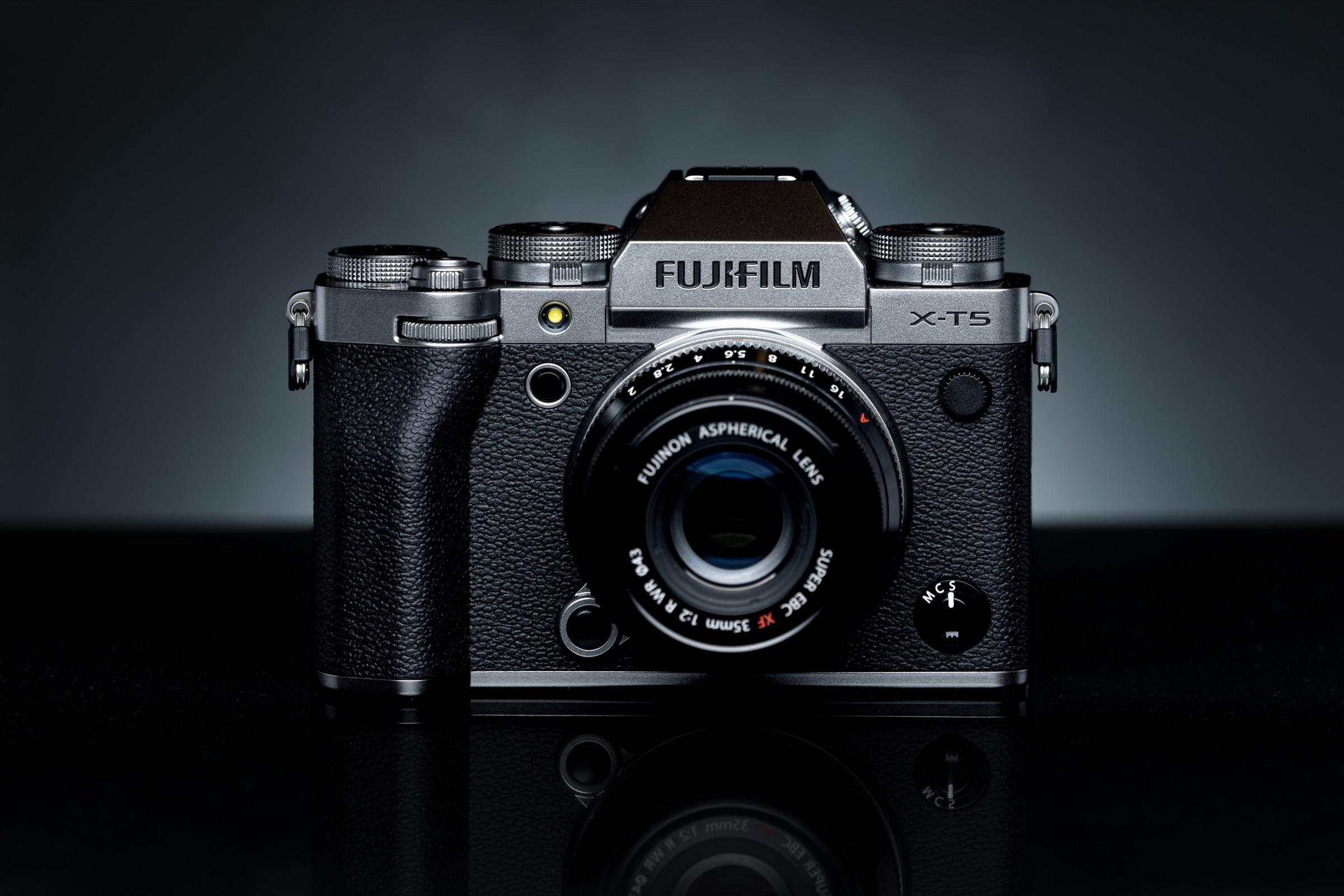
Fujifilm posted a Fujifilm X-T5 firmware update to Ver.4.32 on 10 November 2026, with matching bug-fix builds the same day for the X-H2 (Ver.5.33) and X-H2S (Ver.7.31).
The fixes below come from each camera's official firmware page, checked on 11 November 2026. A fix is listed for a body only when that body's page names it.
What landed on 10 November 2026
Fujifilm's Japanese news note dated 10 November 2026 points to three official updates. The US (and global) download pages, opened on the check date, show:
| Body | Official version | From | Page date stamp |
|---|---|---|---|
| X-T5 | Ver.4.32 | Ver.4.31 | Last updated 11.10.2026 |
| X-H2 | Ver.5.33 | Ver.5.30 / Ver.5.31 | Last updated 11.10.2026 |
| X-H2S | Ver.7.31 | Ver.7.30 | Last updated 11.10.2026 |
The US pages stamp the date as 11.10.2026. Fujifilm Japan's announcement is dated 10 November 2026, so that stamp is treated as 10 November, not 11 October.
The official versions posted on 10 November 2026
- X-T5, from Ver.4.31
- Ver.4.32
- X-H2, from Ver.5.30 / Ver.5.31
- Ver.5.33
- X-H2S, from Ver.7.30
- Ver.7.31
Fujifilm also states, on each of those pages, that an upgrade isn't required if the camera is already on the latest version, and that you should use the camera and lens with the latest firmware if you want their full performance.
For a broader look at Fujifilm's X system in this market, see our Fujifilm brand page. Owners of the fixed-lens X100VI have a separate UAE guide: Fujifilm X100VI in the UAE.
What each official page says the new version fixes
Each of the three official download pages lists the same four named bug fixes, plus "some other minor bugs". The wording below follows those pages. It's not a single list copied from one body onto the others: the X-T5 page lists them for Ver.4.32, the X-H2 page lists them for Ver.5.33, and the X-H2S page lists them for Ver.7.31.
- Horizontal lines on the LCD in a specific stills setup: Drive Mode set to CH High Speed Burst; Shutter Type set to Mechanical + Electronic and shooting with the electronic shutter; shutter speed 1/8000 or faster; Image Disp set to Continuous.
- Abnormal recorded images that may occasionally appear when shooting in ISO BKT or Film Simulation BKT mode.
- A freeze about one minute into playback of movies recorded in Movie mode at 6.2K or higher.
- Manual focus that cannot be adjusted on the XF30mmF2.8 R LM WR Macro when Focus Ring Operation is set to Linear and the rotation angle is set to anything except the default.
These are bug-fix releases, not a new stills or video feature set. If you don't use high-speed electronic-shutter bursts at 1/8000 or faster, ISO or film-simulation bracketing, 6.2K (or higher) movie playback, or that macro lens with a non-default linear focus ring, you may not have seen any of the named bugs. The "minor bugs" item isn't described in more detail on the pages we opened.
Should you update today?
Update today (when you can do it properly) if: you have already seen one of the bugs above; you shoot those exact modes and want the official fix; or you prefer to stay on the current official build, which Fujifilm recommends for full performance.
You can wait if: the camera already reports the latest version (Fujifilm says no upgrade is then required); you're about to walk into a paid job and can't spare a quiet, uninterrupted window of up to about five minutes; or you don't yet have a fully charged battery and a card you're willing to format.
Should you update today?
Does your camera already show the latest version (X-T5 Ver.4.32, X-H2 Ver.5.33 or X-H2S Ver.7.31)?
Fujifilm's own precaution is the reason not to rush: if an update fails, "the camera may no longer operate correctly in some cases." It also warns that once the firmware has been updated, some data of the previous version can't be restored. In the UAE, do the work indoors in a stable, cool enough place, not in a parked car. Heat already stresses camera bodies here; see protecting a camera from heat, sand and humidity in the UAE.
How to update safely, from Fujifilm's instructions
Download the file only from that camera's official Fujifilm firmware page. Don't use a renamed file: Fujifilm warns that if a browser adds a suffix such as "(1)", the camera will not recognise the firmware correctly.
Fujifilm's official procedure for X-series interchangeable-lens cameras, and the short step list on each of the three download pages, is:
- Check the current version. Fujifilm's procedure is to insert a card, turn the camera off, then turn it on while pressing the DISP/BACK button. If the version shown is already the latest, stop.
- Use a fully charged battery. Fujifilm calls this "a basic manner" and says that if the camera turns off during the update, "it won't work well."
- Format a memory card in the camera, after copying off any files you need. Formatting erases everything on the card, including protected files.
- Copy the official firmware file to that formatted card (the generic name pattern Fujifilm gives is FWUP00##.DAT; the exact name varies by model). Then put the card back in the camera.
- Start the update and do not interfere. Fujifilm's card method is to turn the camera on while pressing DISP/BACK, then follow the on-screen prompts. Each of these three download pages also documents a Setup-menu route, added in an earlier version: insert the card and select Firmware Update under User Setting in the Set Up menu.
- Never turn the camera off, and don't use the camera controls, while the firmware is being overwritten. Fujifilm says the process takes approximately five minutes at most.
- Turn the camera off, then check the version again. Fujifilm also says the card used for the update should be reformatted before you use it for taking pictures again.
You can jump from an older version straight to the latest one; you don't have to install the versions in between.
Fujifilm's safe-update steps, in order
XApp, and saving your settings first
Each official download page says a camera paired with a smartphone or tablet can be updated that way, and points to Fujifilm's smartphone method. Fujifilm's FAQ "Camera firmware update procedure with FUJIFILM XApp" walks through downloading the firmware to the phone, joining the camera, transferring the file, and starting the upgrade. Earlier notes on the same official body pages also describe XApp downloading firmware and transferring it to the memory card in the background over Wi-Fi, then prompting on the LCD. Follow the in-app and on-camera prompts. The battery and "do not switch off" precautions still apply.
If you have changed settings from the defaults, save them first. The official X-T5 firmware page recommends FUJIFILM X Acquire (and similar tools). The official X-H2 and X-H2S pages recommend the FUJIFILM Tether App. Fujifilm's settings FAQ covers XApp backup and restore, the Tether App, and X Acquire, and lists the X-T5, X-H2 and X-H2S among compatible products.
The official-file-only habit isn't unique to Fujifilm. Sony's Creators' App help guide likewise tells owners to use a sufficiently charged battery (at least three segments, or 51 percent), an initialised memory card, and not to switch the camera off or remove the card while an update is in progress. That's a process parallel, not a reason to change systems.
Warranty, grey imports, and what we could not find
Fujifilm's worldwide network page lists Grand Stores as the UAE contact for technical support and repairs on digital still cameras, and gives separate Fujifilm Middle East contacts for filmmaking cameras. The same page tells owners to present the warranty and the purchase receipt when requesting repairs, and to refer to the warranty card for the conditions of the warranty. It also says technical support may not be available for models not handled by the local distributor.
We didn't find a statement, on a Fujifilm page or on an official UAE distributor page we could open, that says what an official firmware update does to UAE warranty cover, or how a grey-import body is treated for these updates. We're not inferring either point. Read the warranty card that came with your camera, keep the purchase receipt, and ask Grand Stores (or the contact on your card) about your serial number if you need a repair path in writing.
The firmware download pages include a software licence that supplies the file "as is". That's a licence for the firmware file, not a substitute for your product warranty card, and it isn't a statement about UAE cover.
Sources
All checked 11 November 2026.
- FUJIFILM X Series (USA), X-T5 Firmware update (Ver.4.32, last updated 11.10.2026): official X-T5 version, named bug list, precautions, X Acquire note and XApp route.
- FUJIFILM X Series (USA), X-H2 Firmware update (Ver.5.33, last updated 11.10.2026): official X-H2 version, named bug list, precautions, Tether App note and XApp route.
- FUJIFILM X Series (USA), X-H2S Firmware update (Ver.7.31, last updated 11.10.2026): official X-H2S version, named bug list, precautions, Tether App note and XApp route.
- Fujifilm Japan, X-H2S / X-H2 / X-T5 firmware update (10 November 2026): official announcement dating the three releases.
- FUJIFILM X Series (USA), Firmware update procedure for X series interchangeable lens cameras: official card method, version check, in-camera format, fully charged battery, do not switch off, up to about five minutes, reformat after updating.
- Fujifilm Digital Cameras FAQ, Camera firmware update procedure with FUJIFILM XApp (updated 6 June 2023): official XApp download, transfer and upgrade steps.
- Fujifilm Digital Cameras FAQ, How to save and restore camera settings (updated 21 June 2023): XApp, Tether App and X Acquire backup routes; X-T5, X-H2 and X-H2S listed.
- FUJIFILM X Series (Global), Worldwide Network: Grand Stores listed as the UAE technical support and repair contact for digital still cameras; present warranty and purchase receipt; refer to the warranty card; support may not be available for models not handled by the local distributor.
- Sony Creators' App Help Guide, Updating the camera's system software using Creators' App: official Sony process notes on battery level, an initialised card, and not switching off or removing the card during an update.
Hero photo: Henry Söderlund / Wikimedia Commons, CC BY 2.0, resized.
Frequently asked questions
What is the latest Fujifilm X-T5 firmware update, and when did it land?
On Fujifilm's official X-T5 download page, checked on 11 November 2026, the current body firmware is Ver.4.32, updated from Ver.4.31, with a last-updated stamp of 11.10.2026. Fujifilm Japan's announcement dates the release 10 November 2026.
Do the X-H2 and X-H2S updates fix the same bugs as the X-T5?
Each body's own official page lists the same four named fixes (LCD lines in a specific high-speed electronic-shutter setup, occasional abnormal ISO BKT or Film Simulation BKT frames, a possible freeze about a minute into 6.2K or higher movie playback, and an XF30mmF2.8 Macro manual-focus issue in a non-default Linear focus-ring setting), plus other minor bugs. The X-H2 page is for Ver.5.33; the X-H2S page is for Ver.7.31.
Should UAE owners install the update today, or wait?
Install it today if you have hit one of the listed bugs, or if you want the official current build and can follow Fujifilm's precautions. If the camera is already on the latest version, Fujifilm says the upgrade isn't required. If you need the body for a job in the next hour, wait until you have a full battery and an uninterrupted window.
How do I update Fujifilm firmware safely, step by step?
Use only the official file for your exact model. Check the current version, format a card in the camera after backing up its files, use a fully charged battery, copy the file without renaming it, then start the update from the DISP/BACK method or the Setup menu Firmware Update item. Do not turn the camera off or use the controls while it writes. Fujifilm says it takes up to about five minutes. Then confirm the new version and reformat the card before shooting.
Can I update with FUJIFILM XApp instead of a computer?
Yes. Each official download page says a paired smartphone or tablet can update the camera, and Fujifilm publishes an XApp firmware-update FAQ. Earlier notes on the same body pages describe XApp transferring firmware to the card over Wi-Fi and prompting on the LCD. Keep the battery full and do not switch the camera off during the write.
Does an official firmware update affect UAE warranty, including on a grey-import body?
We couldn't find a Fujifilm or official UAE distributor statement that answers that directly, so we're not inferring one. Fujifilm lists Grand Stores as the UAE support and repair contact for digital still cameras, and tells owners to present the warranty and purchase receipt and to go by the warranty card. Ask that contact about your body if you need a clear answer.

About the editor
André has shot weddings for almost ten years, where every moment happens once and the story has to be caught as it unfolds. He brings that eye for real moments to everything he reviews.
Related stories
Claude Code Camera Hacks? What Photographers Really Changed
A Fuji chased a film look, a Ricoh learned feet and inches, an old Sony got its apps back. What Claude really changed on three cameras, and what it didn't.

Shooting in 45°C: How to Protect Your Camera from Heat in the UAE
Keep stills and video cameras working in UAE heat: operating temps, condensation tips, sand protection, batteries and a practical kit list.

GFX ETERNA 55 price: what the US$9,999 body-only listing leaves out
Retailers list a body-only Fujifilm GFX ETERNA 55 at US$9,999. Their box contents omit the monitor, handle and AC adapter. UAE rent vs buy, explained.